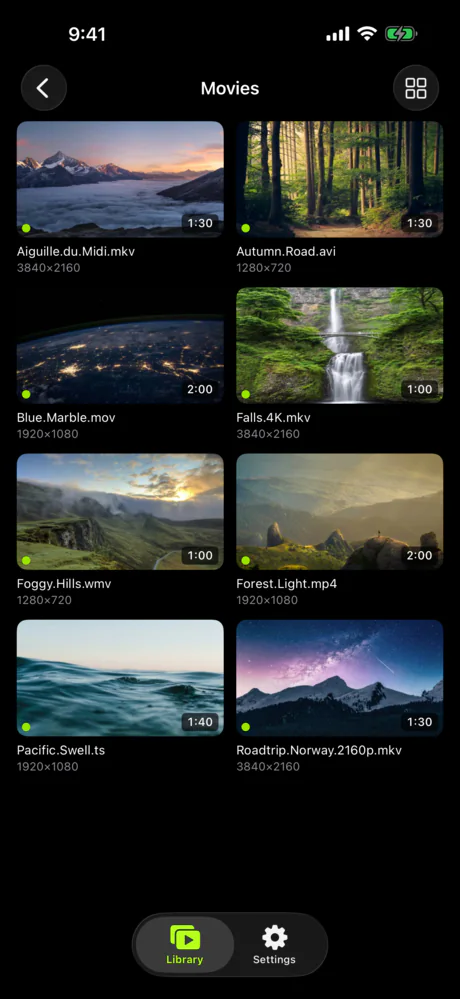
Jellyfin does much more. Here is the small thing Neo Video does.
Jellyfin is a free, open-source media server with a metadata library, user accounts, transcoding, live TV, plugins and clients for nearly every platform. It is the obvious choice for people who want Plex without Plex. This page is not an argument against it. It is for the people who set up Jellyfin to watch their own files on the TV and found the hard part was not the server but the apps: there are many of them, they differ from one another, and the Apple TV one in particular spent years behind the phone app. Neo Video is one server, one set of apps that look and behave the same on every device, and nothing else.
Neo Video is an independent project. It is not affiliated with or endorsed by the Jellyfin project. Jellyfin details were checked on August 20, 2026 and may have changed.
What Jellyfin does that Neo Video does not
Jellyfin costs nothing, has no paid tier, and the code is open. Neo Video's server is free and the apps are a one-time purchase, but it is a closed-source product from a small company.
Jellyfin builds a real library: it matches films and series against TMDB and other providers, downloads artwork and summaries, tracks watch state per user, and supports plugins, live TV with a tuner, SyncPlay for watching together, and hardware-accelerated transcoding for slow links. It also has official clients for Roku, LG webOS, Samsung Tizen, Xbox, Kodi, the desktop and the browser, on top of iOS, Android, Apple TV and Android TV. Neo Video has folders, thumbnails, resume positions, photo browsing, and apps for iPhone, iPad, Apple TV, Android and Android TV.
Jellyfin can be reached from outside the house through a VPN, a reverse proxy or router port forwarding you set up (its own documentation advises against exposing the port directly), and because it transcodes, it can shrink video for a slow connection. Neo Video also needs a VPN for remote viewing and does not shrink video; it only converts when the device cannot decode a file.
Where the two make opposite choices
Many clients versus one set of apps
Jellyfin's strength is that anyone can write a client, so there are many: the official Android, Android TV, iOS and web apps, Swiftfin for iOS and tvOS, Jellyfin Media Player on the desktop, Roku, webOS, Tizen and Xbox apps, a Kodi add-on, and third-party players such as Infuse. Each is maintained by different people on a different schedule, so the interface, the settings and what plays without transcoding differ from one device to the next. Part of setting up Jellyfin is finding out which client works best on each of your screens.
Neo Video has one server and one set of apps, written by the same people. The iPhone, iPad, Apple TV, Android and Android TV apps show the same folders the same way and have the same settings. There is nothing to choose and no third-party client to buy.
Apple TV
Jellyfin's official Apple TV client is Swiftfin, free and on the App Store since December 2022. For a long stretch the Apple TV build stayed on the 2023 release while the iPhone app moved ahead; the maintainers' own status thread described the rewritten tvOS build as not shippable as late as January 2025, and the updated Apple TV version arrived in July 2026. It is improving with each release, but it is a large rewrite that is still settling. Through those years many Jellyfin users on Apple TV used Infuse, a paid third-party app, and plenty still do.
Neo Video's Apple TV app has shipped alongside the iPhone app from the start and is covered by the same purchase. If the TV app is the reason you are reading this, that is the difference in one sentence.
Library and accounts
Jellyfin is a media server in the full sense. You create an admin user, add libraries by content type, point them at folders, choose metadata providers, let it scan, and create a user for each person with their own permissions and watch history. Home videos go into a "Home Videos and Photos" library with no matching. It is all free and all documented, and all of it is configuration.
Neo Video has no users and no library types. You share folders; the app shows them with a thumbnail from each video and the file name as the title. One optional password per server is the whole permission model. If you want profiles, parental controls or a curated film library, Jellyfin is the right tool and Neo Video is not.
Price
Jellyfin is free. Neo Video Server is free; the apps let you connect, browse everything and watch three videos plus all your photos before a single $5.99 purchase per store unlocks the rest. That is the whole price list.
What is the same
Neither sends your library or viewing activity to a company's servers. Both run on a computer you own, Mac, Windows or Linux, and stream to your devices over your own network. Both use ffmpeg to convert files the device cannot play. Both have native Apple TV and Android TV apps, so nothing is mirrored from a phone. Neither has a remote-access service of its own; Jellyfin expects you to set up a VPN, a reverse proxy or port forwarding, and Neo Video expects a VPN.
Trying it alongside Jellyfin
Nothing has to be uninstalled. Install Neo Video Server on the same computer, share the same folders, and open the Neo Video app on one device. Jellyfin keeps serving the same files; Neo Video only reads them. If the server does not appear, the connection guide lists the usual causes. The free tier lets you watch three videos on each device, which is enough to compare the TV apps.
Stay with Jellyfin if
Neo Video does not do the following today. We will update this page if that changes.
- You want open-source software, or do not want to pay for apps.
- Several people use the server and need their own accounts, permissions and watch history.
- You watch on Roku, webOS, Tizen, Xbox, Kodi, a browser or the desktop.
- You want posters, summaries and a matched film and series library.
- You use live TV, DVR, SyncPlay or plugins.
- You need the server to shrink video for a slow connection.