How is Neo Video different from Plex?
You installed Plex to watch a folder of your own videos on the TV, and ended up creating an account, waiting for a scan, scrolling past films you never added, and, since 2025, paying a pass to watch your own files away from home. Neo Video does the folder-on-the-TV part and stops there. Install the server, point it at your folders, open the app on Apple TV or Android TV. Your files stay where they are, with the names you gave them. Plex is a far bigger product, and the reasons to stay with it are further down this page.
Neo Video is an independent project. It is not affiliated with or endorsed by Plex. Plex details were checked on August 20, 2026 and may have changed.
Where the two make opposite choices
Account
Plex needs a Plex account. You sign in on the server and on each app, and the account is how apps find your server and how sharing, remote access and passes work. Playback itself stays on your network, but the sign-in, server registration and some metadata requests go through Plex's service.
Neo Video has no account. The app finds the server on the local network with Bonjour, and if you set a password on the server, that is the only credential. Nothing about your library or what you watch leaves the house. The trade-off is real: with no account there is no sharing with friends, no profiles, and no remote access without a VPN.
Database and scanning
Plex scans your folders into a database, matches each file against its metadata agents, and shows the result as a library of titles. It expects files to be named and foldered in a particular way, and when they are not, titles go missing, merge or match wrongly, and you fix them by hand. Home videos go into a separate "Other videos" library type with no matching. A large library takes a while to scan and rescan.
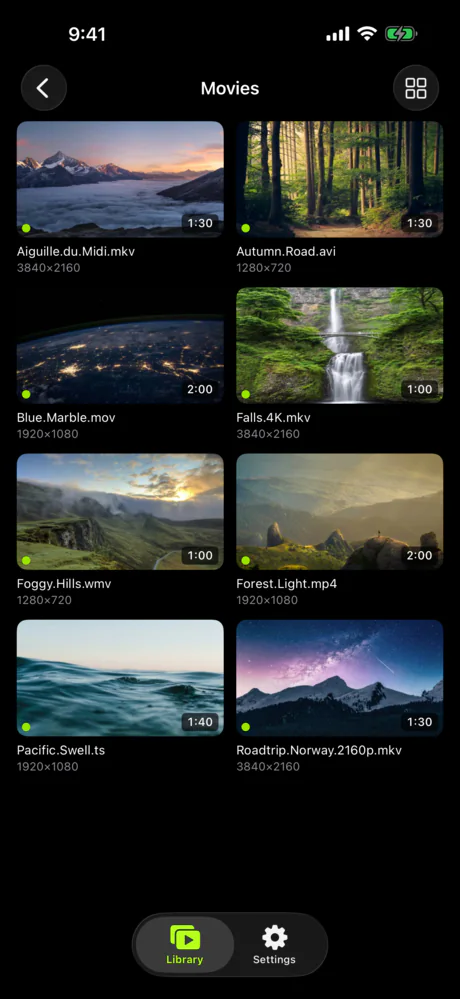
Neo Video does not scan or match. The folders you share are what the app shows, subfolders included, with a thumbnail taken from each video and the file name as the title. There is nothing to wait for after adding a folder and nothing to fix. If you wanted posters and cast lists, this is the wrong app.
Recommendations and online content
Plex's apps open on a home screen that mixes your library with Plex's own free ad-supported films, live channels and "Discover" recommendations. You can turn the online sources off in the server settings and unpin them from the sidebar, and many people do, but it is a setting you have to go and find, and the apps are designed with that content in mind.
Neo Video has no online content, no recommendations and no home screen. The app opens on your servers and folders. There is nothing to turn off.
Price
Plex is free to install and free to watch on your own network. Watching video from your own server away from home has needed a paid pass since April 2025, enforced app by app (the TV apps came later, and music and photos stay free): the Remote Watch Pass at $2.99 a month or $29.99 a year, or Plex Pass at $6.99 a month, $69.99 a year, $249.99 for five years, or $749.99 for a lifetime licence (up from $249.99 on July 1, 2026). A Plex Pass on the server owner's account also covers everyone who streams from that server. Hardware transcoding, downloads, live TV and DVR also need Plex Pass. Neo Video's server is free, the apps are free to try, and unlocking everything is a single $5.99 purchase per store. There is no remote-access tier because there is no remote-access service; you bring a VPN.
Setup
A Plex server asks you to sign in, claim the server, create libraries by type, point each at folders, choose agents and scanners, and then wait for the scan. Remote access may need port forwarding. It is well documented and the defaults are sensible, but it is a media server and it has the settings of one.
Neo Video Server asks you to pick folders. The app on the same Wi-Fi lists the server on its first screen. The setup guide covers Mac, Windows and Linux; the Mac and Windows builds ship with ffmpeg, on Linux you install it with your package manager.
What is the same
Both keep your files on your own computer and stream them to the TV and phone. Both have native Apple TV and Android TV apps, so nothing is mirrored from a phone. Both play MKV and other files the built-in TV apps will not, converting on the server when the device cannot decode a file. Both remember where you stopped.
What Plex does that Neo Video does not
Plex runs on more screens than almost anything else: iOS, Android, Apple TV, Android TV, Fire TV, Roku, most smart TVs, game consoles and a browser. Neo Video has apps for iPhone, iPad, Apple TV, Android and Android TV, and nothing else.
Plex builds a proper library. It identifies films and series, downloads posters, summaries and cast, groups episodes into seasons, and keeps per-user watch history and profiles. Neo Video shows folders and files, remembers where you stopped, and has one optional password per server.
Plex's remote access is built in, with a relay when your router is awkward. It transcodes on the server to fit the connection, and with a pass it can use hardware transcoding, download for offline viewing, and record live TV with a tuner. Neo Video has none of that. Remote viewing means a VPN you run yourself, and the server only converts when the device cannot decode a file, never to shrink it for a slow link.
Stay with Plex if
Neo Video does not do the following today. We will update this page if that changes.
- You share your library with family or friends outside your house, or want separate profiles and watch history per person.
- You want remote access that just works, without running a VPN.
- You watch on Roku, Fire TV, a smart TV app, a game console or in a browser.
- You want posters, summaries, cast lists and a proper film and series library.
- You use live TV, DVR, offline downloads, or Plex's free streaming channels.
- Your connection away from home is slow and you rely on the server shrinking the stream.
Trying it alongside Plex
Nothing has to be uninstalled. Install Neo Video Server on the same computer, share the same folders, and open the Neo Video app on one device. Plex keeps scanning and serving the same files; Neo Video only reads them. If the server does not appear, the connection guide lists the usual causes. The free tier lets you watch three videos, which is enough to see whether the folder-first approach suits you.