Infuse is great. Here is when Neo Video fits better.
Infuse does far more than Neo Video. It plays almost every container and codec in existence, handles Dolby Vision and DTS-HD, pulls posters and episode art from TMDB, syncs your library through iCloud, and plays files stored on the device as well as NAS shares, cloud drives and Plex, Emby or Jellyfin servers. If you are happy with it, keep using it. This page is for the people who keep running into the same few things: there is no Android version, the metadata library gets in the way of a folder of home videos, and the views are shaped for film posters rather than 16:9 clips. Neo Video is a smaller, plainer app that happens to sit on the other side of each of those choices.
Neo Video is an independent project. It is not affiliated with or endorsed by Firecore or Infuse. Infuse details were checked on August 20, 2026 and may have changed.
What Infuse does that Neo Video does not
Read this section first, because the list is long. Infuse plays 3GP, AV1, BDMV, ISO, VIDEO_TS, VOB, RMVB and dozens of other formats on the device itself. Neo Video supports MP4, MOV, MKV, AVI, WMV, FLV and TS, and when the device cannot decode a file the server converts it to H.264/AAC. Infuse Pro also handles Dolby Vision, HDR10+, Dolby Atmos and DTS-HD audio. Neo Video does not try to match that.
Infuse reads from SMB, NFS, WebDAV, FTP and SFTP shares, from Dropbox, Google Drive, OneDrive and other cloud drives, and from Plex, Emby and Jellyfin servers. Neo Video only talks to its own server, Neo Video Server, on a Mac, Windows or Linux computer you run yourself.
Infuse runs on Mac and Vision Pro as well as iPhone, iPad and Apple TV, builds collections and playlists, skips intros and credits, syncs watch status with Trakt, and keeps the library and in-progress queue in sync across devices through iCloud. Neo Video has none of these. It keeps resume positions per server and that is about it.
Where the two apps make opposite choices
Android and Android TV
Infuse runs on iPhone, iPad, Apple TV, Mac and Vision Pro. There is no Android version, and Firecore's published feature roadmap (last updated June 2026) does not list one. If someone in the house watches on an Android phone or an Android TV, Infuse cannot help.
Neo Video has native apps for iPhone, iPad, Apple TV, Android and Android TV. One App Store purchase covers iPhone, iPad and Apple TV; one Google Play purchase covers Android and Android TV. The same server feeds all of them, so a family with one Apple TV and one Android TV sees the same folders on both.
Metadata matching
Infuse identifies each file against TMDB and builds a library of Movies, TV Shows and Other. This works well when your files are named the way its guide recommends, such as "Pulp Fiction (1994).mkv" or "show name/season 1/02 Episode.mkv". It works less well with camcorder clips, screen recordings, lecture videos, or a drive full of files named by date. Those can land under Other or match the wrong title, and Infuse's own guides cover the fixes: editing metadata by hand, adding NFO files, or excluding folders from scanning. It works, but it is work.
Neo Video does not fetch metadata at all. The folders you share on the server are the library, shown as they are on disk, with subfolders. The thumbnail is a frame from the video itself, the title is the file name, and nothing is sent to TMDB or anywhere else. If your collection is already organised the way you want it, there is nothing to set up. If you wanted posters and synopses, this is the wrong app.
Portrait posters versus 16:9 thumbnails
Infuse's library is built around poster artwork. Its guide recommends 1000 by 1500 pixel posters (a 2:3 ratio), with 16:9 fanart as a secondary image, and for files that have no match it can pick a frame from the video. That design makes sense when most of the library is films and series. For a drive of 16:9 home videos, the poster-shaped views are not the shape of the content, and many people end up supplying their own artwork files to get the look they want.
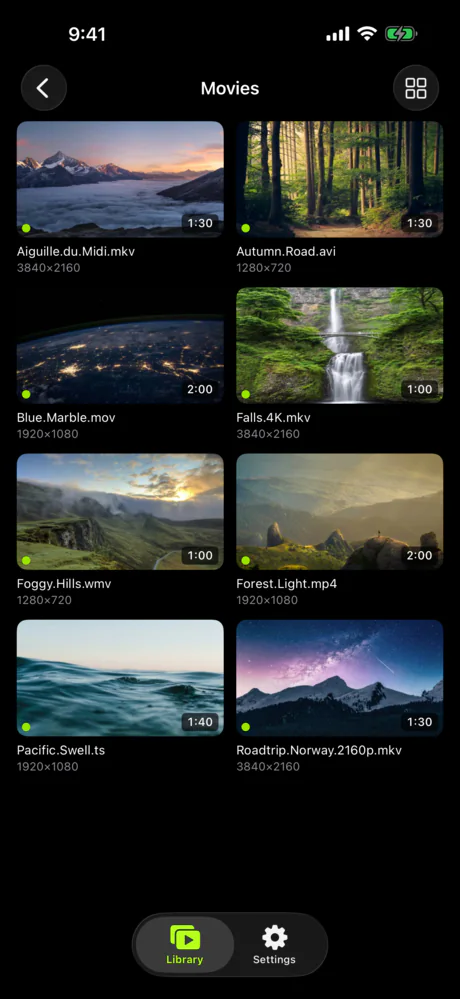
Neo Video's browse grid uses 16:9 thumbnails generated from the video, with a list view when you would rather read file names, durations and resolutions. You can tell "the one where the dog jumps in the pool" from "the one at the beach" without opening either.
Subscription versus one-time purchase
Infuse is free with limits. Infuse Pro, which unlocks the extra formats, HD audio and cloud streaming, is $1.99 a month, $16.99 a year, or $99.99 once for a lifetime licence. Neo Video's free tier lets you connect to your server, browse everything and watch three videos plus all your photos; after that it is a single $5.99 purchase per store, and the server is free. Infuse does offer a lifetime option, so this is not a subscription-versus-purchase argument so much as a difference in how much the app is trying to do and what it charges for it.
What is the same
Neither app needs an account. Infuse has no sign-in of its own (your source might), and Neo Video has an optional password per server and nothing else. Both play files that stay on hardware you own. Both are native on Apple TV, so the TV connects to the source directly and nothing is mirrored from a phone.
Both find things on the local network without typing addresses. Infuse browses SMB and UPnP shares; Neo Video discovers its server with Bonjour. And both play MKV on Apple TV, which is the usual reason people go looking for a third-party player in the first place.
Trying it without giving up Infuse
The two apps do not conflict. Install Neo Video Server on the computer or Mac that already holds your files, add the same folders you point Infuse at, and install Neo Video on one device. The server should show up on the first screen; if it does not, the connection guide covers the usual causes. Infuse keeps reading the same folders through whatever share it already uses, so you can use Infuse for the film collection and Neo Video for the home-video drive if that is what makes sense.
Stay with Infuse if
Neo Video does not do the following today. We will update this page if that changes.
- You want posters, synopses and episode titles without naming files yourself.
- Your files are on a NAS, a cloud drive, or a Plex, Emby or Jellyfin server and you do not want to run another program on a computer.
- You rely on Dolby Vision, Dolby Atmos or DTS-HD passthrough.
- You watch ISO, BDMV, VIDEO_TS or other disc-image formats.
- You want watch status synced across devices or to Trakt.
- You watch on a Mac or Vision Pro.